



Complete your purchase
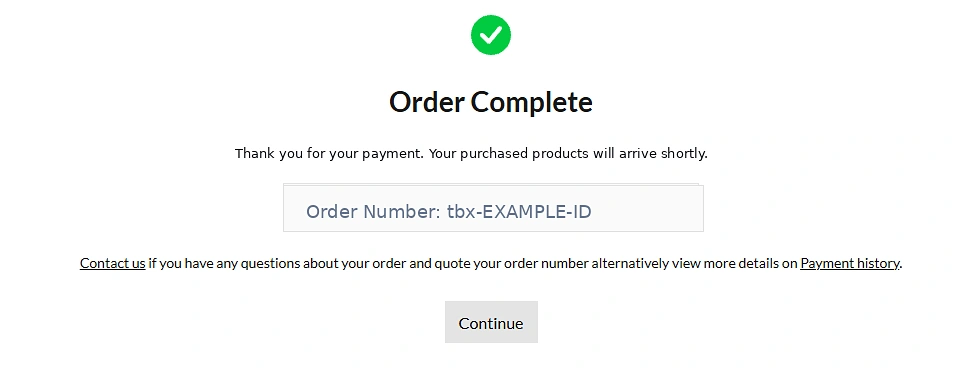
After purchasing your car through Tebex, you'll see an Order Complete confirmation screen. This shows your personal purchase ID.
Example checkout confirmation — your purchase will have its own unique ID.Discover vehicles, businesses and exclusive packages for your journey through Los Santos.
STANDARDEveryday vehicles
PREMIUMPremium collection
SUPERPerformance collection
LIMITEDLimited collection
Choose a category to browse real packages, images and prices directly from our Tebex store.
Browse the collection.
Explore player-owned business packages available in Expand RP.
Create something of your own in Los Santos.
Purchased a vehicle? Follow these simple steps to redeem it in Expand RP and find it at Legion Square Garage.
After purchasing your car through Tebex, you'll see an Order Complete confirmation screen. This shows your personal purchase ID.
Example checkout confirmation — your purchase will have its own unique ID.Look for the Order Number on that confirmation. Copy the whole code, including the tbx- at the start.
tbx-xxxxxxxxxxxxxxxx-xxxxxxJoin the city and make sure you're playing as the character you want the vehicle to belong to before redeeming.
Open in-game chat and type /claim, then a space, followed by your complete Tebex purchase ID.
/claim YOUR_TBX_PURCHASE_IDA new purchase can take up to 10 minutes to register on the server. If the command says the purchase is new or still being reviewed, wait a couple of minutes and try again.
When successful, the city will show a redemption notification and confirm that the vehicle has been added to your garage.
Real in-game notification, cleaned to remove the unrelated money HUD.Once the redemption is confirmed, visit the garage at Legion Square, open the garage menu and select your new vehicle. These are real screenshots from Expand RP.
Find the Legion Square area on your map and travel to the garage.
Look for the blue 24 HR PARKING booth and open the garage.
Open the Legion Square garage menu and collect your purchased car.
Need help? If your Tebex purchase is still processing, allow up to 10 minutes and retry /claim with the same purchase ID. Don't buy the package a second time.
A huge thank you to everyone supporting Expand RP. Rankings use confirmed Tebex purchases.
Everything you need to know about buying through Expand RP.
After checkout, copy the full tbx- Order Number, join the correct character and use /claim YOUR_TBX_PURCHASE_ID in chat. Allow up to 10 minutes for the purchase to register, then collect it from Legion Square Garage. Read the illustrated step-by-step guide.
Our vehicle collections focus on lore-friendly GTA / FiveM vehicles, not real-world car brands.
Payments are handled securely by Tebex. We do not receive your card information.
Yes, visit expandrp.tebex.store for an alternative checkout.
This is an example. Use the purchase ID from your own Tebex order.